Friday, June 09, 2006

The State of Virtualization

Storage Virtualization is the logical abstraction of physical storage devices enabling the management and presentation of multiple and disparate devices as a single storage pool, regardless of the device’s physical layout, and complexity.

As surprising as it may seem, Storage Virtualization is not a new concept and has existed for years within disk subsystems as well as on the hosts. For example RAID represents an example of virtualization achieved within RAID arrays in that it reduces disk management and administration of multiple physical disks into few virtual ones . Host based Logical Volume Managers (LVM) represent another example of a virtualization engine that’s been around for years and accomplishes tasks similar.

The promise of storage virtualization is to cut costs by reducing complexity, enabling better and more efficient capacity utilization, masking the inherent interoperability issues caused by the loose interpretation of the existing standards, and finally by providing an efficient way to manage large quantities of storage from disparate storage vendors.

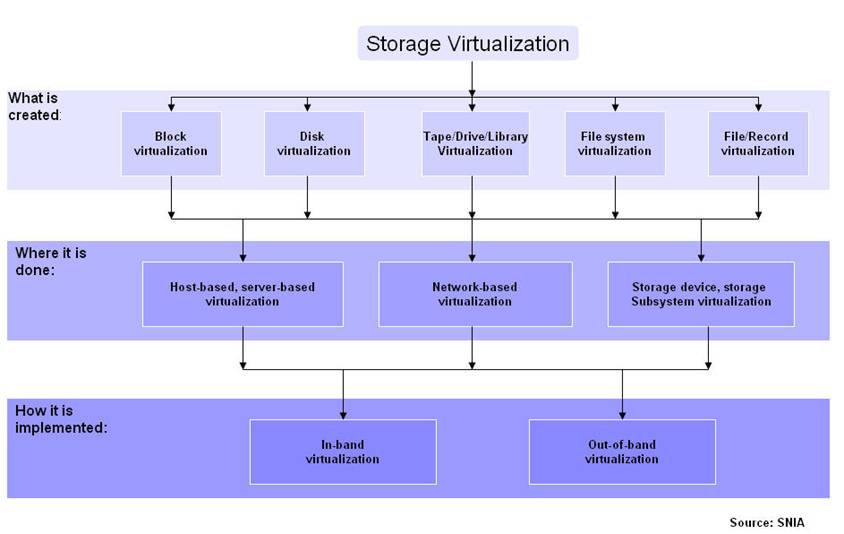
The logical abstraction layer can reside in servers, intelligent FC switches, appliances or in the disk subsystem itself. These methods are commonly referred to as: host based, array based, controller based, appliance based and switch based virtualization. Additionally, each one of these methods is implemented differently by the various storage vendors and are sub-divided into two categories: in-band and out-of-band virtualization. Just to make things even more confusing, yet another terminology has surfaced over the past year or so, the split-path vs shared-path architectures. It is of no surprise that customers are confused and have been reluctant to adopt virtualization despite the promise of the technology.

So lets look at the different virtualization approaches and how they compare and contrast.

Host Based – Logical Volume Manager

LVMs have been around for years via 3rd party SW (i.e Symantec) or as part of the Operating System (i.e HP-UX, AIX, Solaris, Linux). They provide tasks such as disk partitioning, RAID protection, and striping. Some of the them also provide Dynamic Multipathing drivers (i.e Symantec Volume Manager). As it is typical with any software implementation the burden of processing falls squarely on the shoulders of the CPU, however these days the impact is much less pronounce due to the powerful CPUs available in the market. The overall performance of an LVM is very dependent on how efficient the Operating System is or how well 3rd party volume managers have been integrated with the OS. While LVMs are relatively simple to install, configure and use, they are server resident software, meaning that for large environments multiple installation, configuration instances will need to be performed as well multiple and repetitive management tasks will need to be performed.. An advantage of a host based LVM is independent of the physical characteristics of external disk subsystems and even though these may have various performance characteristics and complexities, the LVM can still handle and partition LUNs from all of them.


Disk Array Based

Similar to LVMs, disk arrays have been providing virtualization for years by implementing various RAID techniques. Such as creating Logical Units (LUNs) that span multiple disks in RAID Groups or across RAID Groups by partitioning the array disks into chunks and then re-assemble them into LUs. All this work is done by the disk array controller which is tightly integrated with the rest of the array components and provides cache memory, cache mirroring as well as interfaces that satisfy a variety of protocols (i.e FC, CIFS, NFS, iSCSI). These types of Disk arrays virtualize their own disks and do not necessarily provide attachments for virtualizing 3rd party external storage arrays, thus Disk Array virtualization differs from Storage Controller virtualization.


Storage Controller Based

Storage controller virtualization is similar to Disk array based in that they perform the exact same function with the difference being that they have the ability to connect to, and virtualize various 3rd party external storage arrays. An example of this would the Netapp V-Series. From that perspective the Storage controller has the widest view of the fabric in that it represents a central consolidation point for various resources dispersed within the fabric. All this, while still providing multiple interfaces that also satisfy different requirements (i.e CIFS, NFS, iSCSI).

Appliance Based

Fabric based virtualization comes in several flavors. It can be implemented, out-band within an intelligent switching platform using switching blades. It can also be implemented in-band using an external Appliance or out of-band using an Appliance. In-band is used as a means to denote the position of the virtualization engine relative to the data flow. In-band appliances tend to split the fabric in two providing a Host view on one side of the Fabric and a storage view on the other side. To the storage arrays, the Appliance appears as an Initiator (Host) establishing sessions and directing traffic between the hosts and the disk array. In-Band virtualization appliances send information in the form of metadata with regards to the location of the data using the same path as the one used to transport the data. This is referred to as a “Shared Path” architecture. The opposite is called “Split Path”. The theory is that separating the paths provides higher performance, however, there is no real world evidence presented to date that validates this point.

An out-of-band Appliance implementation separates the data path (thru the switch) from the control path (thru the appliance) and requires agents on each host that will maintain the mappings generated by the appliance. While the data path to the disk is shorter in this scheme, the installation and maintenance of host agents does place a burden on the administrator in terms of maintenance, management and OS concurrency.

Switch Based

Switch based virtualization requires the deployment of intelligent blades or line cards, that occupy slots in FC director class switches. One advantage they have is that these blades are tightly integrated with the switch port blades. On the other hand they do occupy director slots. These blades run virtualization SW primarily on Linux or Windows Operating systems. The performance of this solution is strictly dependent upon the performance of the blade since in reality the blade is nothing more than a server. However, there are blade implementations that utilize specialized ASICs to cope with any performance issues.

Conclusion

The current confusion in the market is partially created by the many implementation strategies as well as by “clear-as-mud” white papers and marketing materials regarding the various implementation methods. Regardless which method you choose to implement, testing it in your labs is the only way to find out if the solution’s worth the price.

Saturday, May 27, 2006

VTL Part 2


It's evident that VTLs are becoming popular backup and recovery targets. Among others, Netapp has also jumped onto the bandwagon, I figured I'd talk a little bit about the NearStore VTL offering.

A year ago Netapp announced the acquisition of Alacritus. At the time Alacritus was a privately held company out of Pleasanton, CA and Netapp first partnered with Alacritus around December 2004. Together they offered a solution comprised of a Netapp Nearline storage array and the Alacritus VTL package. Less than 6 mos later Netapp decided to own the technology so it acquired Alacritus.

Alacritus Background

As mentioned above, Alacritus was a privately held company. Alacritus has been in the VTL business and in the general backup business a lot longer than people think. The principals at Alacritus have been together for 15 years and are responsible for several backup innovations. They are the ones who with Netapp co-developed the Network Data Management Protocol (NDMP). They developed BudTool which was the first open systems backup application. They developed Celestra, which is the the first server-less backup product. They pioneered XCOPY, extended copy SCSI command. In 2001, Alactitus developed the 1st VTL and have been delivering it since then, before other VTL competitors were even incorporated. Alacritus strategy at the time was to sell the solution thru OEMs and resellers in Japan. Most notably Hitachi.

Technology

There are several technological innovations within the Netapp NearStore VTL delivering key benefits to customers but i'll only address 3-4 of them as I don't want to write an essay.

  • Continuous Self-tuning - The NearStor VTL continuously and dynamically load balances backup streams across *all* available resources (disks) thus maintaining optimal system performance without developing hot spots. That means that backup streams are load balanced across all the Disk Drives across all Raid Groups for a Virtual Library which in turn means that Virtual Tapes do not reside at fixed locations. That provides the ability to load balance traffic based on the most available drives. Utlimately, what this means is that customers do not have to take any steps to manually tune the VTL.

  • Smart Sizing - Smart sizing is based on the fact that all data compresses differently. Since data compresses at different rates, the amount of data that will fit into a tape changes from backup to backup. If you take into account that a Virtual Tape eventually will be written to a Physical Tape you want to make absolutely sure that the amount of data on the Virtual Tape will fit onto the Physical Tape. To address this, most VTL vendors make the capacity of the Virtual Tape equal to the Native capacity of the Physical Tape. The NearStor VTL offers a unique approach. By using high-speed statistical sampling of the backup stream, and by having knowledge of the Tape Drive's compression algorithm, it determines how well the data will compress when it gets to the Tape drive, and adjusts the size of the Virtual Tape accordingly to closely match the compressed capacity of the Physical Tape drive. As a result of this, customers obtain significantly higher physical media utilization rates compared to other VTLs. As an example, consider a backup of 400GB and a tape cartridge with a native capacity of 200GB. A typical VTL will need 2 Virtual Tapes each with a 200GB native capacity. If the Physical Drive compresses at 2:1 ratio that means that you'll write 200GB thus filling 1/2 of the tapes plus you'll need 2 Physical tapes to export to. With Smart Sizing, the Virtual Tape size will be adjusted to 1 Virtual Tape of a 400GB size. At a 2:1 drive compression ratio, you only need 1 Physical Tape of 200GB that will be fully utilized. The point is less cost by purchasing and managing less tapes.

  • Data Protection - There are 2 mechanisms that enable Data protection within the NearStore VTL. RAID and Hot Sparing is one. The second mechanism is called Journaled Object Store (JOS). All metadata is Journaled ensuring the data integrity of committed writes, even in the event of an unclean shutdown. Metadata is stored in multiple places and the data on each disk is self-describing. What that means is that in the event of a catastrophic failure where the appliance's metadata is completely lost, data that is still available on disk can be accessed. One thing of importance is other VTLs will lose all data if their metadata ever becomes inaccessible.

  • Pass-Thru Restores - When a physical tape is selected for a restore, it automatically gets imported as a virtual tape and data is copied in the background. However, if a specific file is requested that has not been copied to the virtual tape yet, the NearStore VTL will use a pass-thru mechanism, select the specific file from the physical tape and restore it. After the specific process has been completed, it will continue importing the rest of the image.

One thing that our customers find important is that Netapp owns the technology without 3rd party dependencies that control the development and provide 2nd or 3rd level support of the core technology.

Wednesday, May 24, 2006

VTL & Tape: A Symbiotic Relationship

A lot has been written over the past year about advantages and disadvantages of tape. One thing for sure though is that Tape's not going anywhere anytime soon for various reasons some of which are included below:

  1. Tape is deeply entrenched in the Enterprise
  2. Tape's a cost effective long term storage medium
  3. Backup applications understand Tape and perform their best when streaming to a Tape drive rather than a filesystem.
  4. Tape can be easily moved offsite for vaulting purposes.

But Tape has some distinct disadvantages some of which include:

  1. Tapes are unreliable and susceptible to environmental conditions (i.e heat/humidity etc).
  2. You won't know of a bad tape until you attempt to recover from it.
  3. Sharing Tape drives requires additional software and adds cost and complexity.
  4. Streaming to a tape drive is not simple, especially with incremental backups. And while it can be done, via multiplexing, the latter has a significant effect on recovery since all interleaved streams must be read by the backup server.
  5. In order to share Tape libraries between servers additional software must be purchased, adding cost as well as complexity.

One approach that customers have been using to address the above issues is to backup to a conventional disk array using D2D backup. However, what they find is that this approach adds additional configuration steps, in that they would still have to provision storage to the backup application using the disk vendors provisioning tools, still have to create RAID Groups, still have to create LUNs, still have to make decision regarding cache allocations and finally they still have to manage it.

Then, reality sets in...Disk is not easily shared between servers and Operating systems without a Shared SAN filesystem or by carving and managing multiple LUNs to multiple servers/apps. All this means additional cost, complexity and management overhead. Addressing a challenge by making it more challenging is not what people are looking for. This is where the VTL comes into play.

An integrated appliance with single or dual controllers and disk behind, that looks like, feels like tape but it's...Disk. Disk that Emulates Tape Libraries, with Tape drives, slots, Entry/Exit ports and Tape cartridges. Backup SW, since their inception were designed with Tape in mind, not disk. They know Tape, they perform very well with tape. They know little about disk and in some cases do not integrated at all with disk, nor do they perform optimally with disk.

The VTL on the other hand appears to the Backup SW as one or more Tape Libraries of different type and characteristics (drive type, slots #, capacities). They also eliminate the need to stream to disk regardless of the backup you are taking (full/incremental) since inherently disk is faster than tape. This also means that you don't have to multiplex thus making your recovery fast.

You could also easily share a single VTL among multiple servers providing each server with its own dedicated Tape library, drives, slots, robot. Essentially, what you end up is with a centrally located and manage Virtual Library that looks, feels and behaves as a dedicated physical library to each of your servers.

Another benefit of the VTL is that is easily integrated with a real Physical Tape library. In fact, the majority of the implementations require it by positioning the VTL in front of a Physical Tape library. The VTL will then emulate the specific tape library with its associated characteristics such as, number of drives, slots, barcodes, robot etc. After a backup has completed you then have 2 choices with regards to Physical Tape creation.

Traditional Physical Tape Creation Approach

Using this approach, the backup server is responsible for direct physical tape creation. In other words, the backup server controls the copy process as well as providing reporting capabilities incorporated into the backup sw. However, the backup server must process every tape twice which can increase the time required to create offsite tapes. Since the data path goes thru the backup server, this process will require specific windows that do not coincide with a regular backup windows. This method allows for the independent tracking of physical and virtual tapes but the process is slower from a performance perspective. Every VTL vendor supports this method.

VTL Direct Tape Creation Approach

Under this scenario, after the backup to the Virtual Tape is complete, the backup application will issue an eject to the virtual tape based on an aging policy. At this point, the Virtual Tape contents are copied to the Physical tape, in the background, using the same barcodes. Upon completion, the virtual tape is deleted from the virtual library. The benefit of this approach is that the backup server is not involved in the process. The requirement with this approach is that the VTL must be 100% compatible with the Backup application media management and be able to write the backup in the backup application's native format. Netapp's Nearstore VTL offers this approach as well as the Traditional Method while others offer one or the other.

There are many more useful features a VTL provides. One that I find extremely useful is the ability to create Shadow Tapes. What is a Shadow Tape?

When you export a Virtual Tape, in parallel with the creation of the Physical Tape, the VTL creates a shadow tape that is stored in a shadow vault. The backup application continues to manage the Physical tape while the shadow tape is invisible. If you later import the Physical Tape, the shadow Tape is moved form the vault into the library, which makes it available for reading immediately. The VTL manages the retention and expiration of shadow tapes.

VTLs are packed with many more features, some of which I'll be addressing in the next couple of days as a follow up to this writeup as well as give an overview of Netapp's Nearstore VTL story.

Friday, May 19, 2006

FlexVols: Flexible Data Management

If you're managing Storage you're most likely to have experienced some of these issues. Too much storage is allocated and not used by some applications, while other apps are getting starved. Because application reconfiguration is not a trivial process and it's time and resource consuming, let alone it requires application downtime, most folks end up buying more disk.

The root of the problem with data management is that it relies heavily on forecasting and getting the forecast right all the time is an impossible task. Another issue with Data Management is that there are too many hidden costs associated with it. Costs that can include configuration changes, training, backup/restore, and data protection etc.

In addition, there's risk. Reconfigurations are risky in that they can potentially impact reliability. DataONTAP 7G with FlexVols addresses all of the above issues plus some more.

DataONTAP 7G virtualizes volumes in Netapp and Non-Netapp storage systems (V-Series) by creating an abstraction layer that separates the physical relationship between volumes and disks. A good analogy I read from a Clipper Group report was comparing capacity allocated to FlexVols versus other traditional approaches, to a wireless phone versus a landline. While every phone has a unique number the wireless phone can be used anywhere, whereas the landline resides in a fixed location and can not be moved easily.

FlexVols are created on top of a large pool of disks called an Aaggregate. You can have more than one aggregate if you want. Flexvols are stripped across every disk in the aggregate and have their own attributes which are independent of each other. For example, they can have their own snapshot schedule or their own replication schedule. They can also be increased or decreased in size on the fly. They also have another very important attribute. Space that is allocated to flexvol but not used can be taken away, on the fly, and re-allocated to another flexvol that needs it. The Aggregate(s) can also be increased in size on the fly.

Flexvols can also be cloned using our FlexClone technology which I'll address another day. But just so everyone understands, a Flexclone represents a space efficient point-in-time copy (read/write) of the parent Flexvol but can also be turned into a fully independent Flexvol itself.

Another important aspect of the flexvols is size granularity. Starting with a size of 20MB up to 16TB it gives users the ability to manage data sets according to their size while at the same time, obtain the performance of hundreds of disks. Couple that with DataONTAP's FlexShare, Class of Service, we have a very elegant solution for application consolidation within the same aggregate. By deploying 7G the days of wasting drive capacity in order to obtain performance are gone.

Another very useful feature of 7G is the ability to do Thin Provisioning as well provide Automated Policy Space Management in order to address unforseen events that can be caused by sudden spikes in used capacity.

I'll be writing more on the last two subjects pretty soon so stay tuned

Thursday, May 11, 2006

The Kilo-Client Project: iSCSI for the Masses...

A little bit over a year ago Netapp Engineering was challenged to build a large scale test bed in order to exploit and test various configurations and extreme conditions under which our products are deployed by our customers. Thus, the Kilo-Client project was born.

Completed, early 2006 the Kilo-Client project is, most likely, the World's Largest iSCSI SAN with 1,120 diskless blades booting of the SAN and providing support for various Operating Systems (Windows, Linux, Solaris) and multiple applications (Oracle, SAS, SAP etc). In addition, Kilo-Client, incorporates various Netapp technological innovations such as:

SnapShot - A disk based point in time copy
LUNClone - A a space optimized read/write LUN
FlexClone - A space optimized read/write Volume
SnapMirror - Replication of Volumes/qtrees/LUNs
Q-Tree - A logical container within a volume used to group files or LUNs.
SnapRestore - Near instantaneous recovery of a Volume or a LUN to a previous PIT version.

Today, not only, does the Kilo-Client project serves as an Engineering test bed but also as a facility where our customers can test their applications under a variety of scenarios and conditions. For more information on the Kilo-Client project click the link.

You may also want to consider registering for the Tech ONTAP Newsletter since there's ton of valuable information that gets posted on it on a monthly basis, from Best Practices, to new technology demos, tips/tricks and Engineering interviews.